Home Office Physical Equipment (IT, furniture, ergonomics, etc.)

A thread focusing on the physical tools needed for stock trading/investing, such as computers and equipment, phones, desks/chairs, ergonomics, etc. Topics are not limited to these, but here are a few examples of what could be discussed here:
-Acquiring a new computer
-Computer problems
-What kind of workstation do you have?
-Getting a good chair or even an adjustable desk
-Help finding a good monitor arm
-Can stock trading be done well with just a phone?


A quick look at my own workstation, which is currently being updated:
The starting point was a dismantled kitchen counter, which has found new life as a desk. The computer was a 10-year-old PC, reminiscent of a steam engine in speed, and the office chair was at least as old, the cheapest possible office chair that wobbled in every direction, and an uncomfortable peg stuck out under my backside. So, the need for an upgrade was great!

I started the upgrade by replacing the PC with something a step up from the “entry-level” model. The criteria were multiple outputs for monitors, SSD storage, a memory card reader, and wireless connections. Along with the old monitor, a second monitor was added, which has been particularly useful when trading. Still, running out of space, a third monitor, a 28" affordable 4k display, has now been added.

Three monitors, each on its own stand, take up a lot of desk space, so a triple monitor arm will soon be on the shopping list. I’ve already done some research, and the purchase will be something that can be expanded later if needed. I still need to delve into this a bit more, as the arm needs to be sturdy enough so that the adjustments stay put when raising/lowering the desk and everything doesn’t wobble haphazardly. (Oh, and it would preferably be affordable too..)

The kitchen counter has already been updated to an ancient writing desk, but that too is giving way, and I plan to get a proper electric adjustable desk. Electric, so I can stretch occasionally by working while standing. Desks from Isku, Martela, or similar brands have been on my radar, and I might soon acquire one used from a place selling old office furniture. A chair has also been sought, but I couldn’t bring myself to buy a “thousand-euro” office chair. Fortunately, I found a gaming chair for a couple of hundred at Motonet, which has felt like a really good choice for its price/quality ratio. The adjustments are sufficient, and it feels sturdy. Durability will be seen eventually.

To top it all off, I also bought some kind of UPS, so that a quick power outage doesn’t crash the computer if I happen to be in the middle of a faster trade. Of course, a phone works as a backup device even during a power outage, but it gets difficult.


I’ll start with a computer problem.. Next to the HD monitor, there is now a 4k monitor, and it’s annoying that the mouse only moves from the 4k monitor to the lower resolution monitor from above the vertical halfway point. It’s probably explained by the resolution differences between the monitors, but it’s annoying. Can this be fixed in any way so that the mouse moves to the adjacent monitor from its entire side?
12 Likes

Not an answer but I recommend an ultrawide monitor, either 34" or even wider. It’s easy to get a lot of data on the screen. For enthusiasts, two of these stacked.

2 Likes


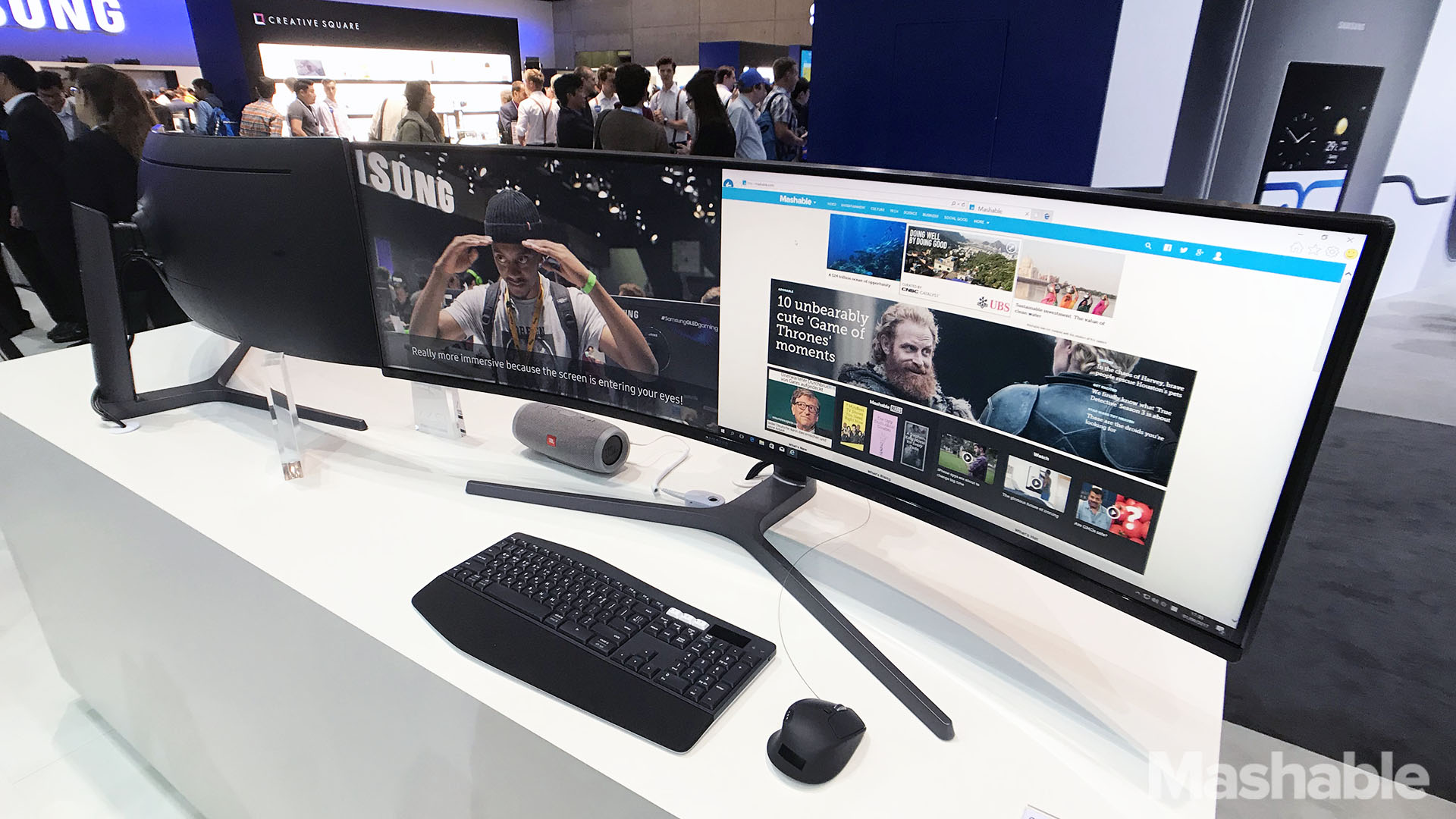
Uh yum yum. :slight_smile: 49" option

4 Likes

I went to pick up that 28" 4k monitor (299 €) today, and there was a 49" ultrawide on display at the store. Quite a sight, and for a moment I thought about getting one, but it was a bit expensive at around 800 €. It might have been something like what @Bansku posted. It works either as one wide screen or you can connect two display cables, making it essentially two separate screens.

3 Likes

I bought the following monitor stand from German Amazon and have been really happy with it after half a year of use.
Amazon definitely has a large selection of stands, also for multiple monitors, but when buying a stand, you should consider the size of the monitor, e.g. this one is for max. 27" monitors.

1 Like

If you’re planning to get an electric desk, good ones cost an arm and a leg. A used electric desk is an excellent purchase. I bought mine through an intermediary from a bank. The original price was about 1200, but I got it for 300. It works like new. You can save almost a thousand euros if a few minor dents don’t bother you. Of course, sometimes you have to treat yourself by buying the best :wink:

2 Likes

Yeah, if you can get in when companies are changing furniture, you can make some real finds. Nothing like that in sight right now, so I’ve been looking at used ones here https://www.pari.fi/. One Isku model is new for 650€, and the same used for 450€ with a warranty. Not a huge discount, and it wouldn’t be too expensive even new, but I might look there if nothing comes up for sale nearby on Tor or similar.

For monitor arms, I’d be interested in a stand like this one for a hundred euros, because it fits three monitors, seems sturdy, and can be expanded with two more. The size is max 32" and even 34" for the expansion slots. I probably won’t get monitors that big, but since I already got this one 4k monitor that’s 28", it would be suitable.

https://www.jimms.fi/fi/Product/Show/148494/aemnt00051a/arctic-z3-pro-gen-3-monitorivarsi-kolmelle-monitorille-musta

Verkkokauppa (online store) probably had a similar three-monitor stand that was expandable for 300-400€, so there’s no need to think twice about which one to choose if this cheaper one is just sturdy enough.

I’ll have to check Amazon and eBay to see what they sell similar ones for. For a difference of twenty euros, I can still buy from Finland.

1 Like

I can recommend the Arctic monitor arm I mentioned with reservations. It feels sturdy, and the expansion slots allow for two additional monitors if three aren’t enough. You just need to be prepared to set it up properly all at once if you don’t have access behind the desk, as adjusting the tilt of the monitors always involves a few hex screws. Minor adjustments closer/further away using the monitor arm’s joints are still possible without that. For its price, a hundred-euro stand is good enough, as long as you have a sturdy desk that doesn’t wobble too much. A downside is that the height adjustment for the middle monitor wasn’t low enough, so now I have two identical monitors at a 2 cm different height from each other. It doesn’t bother me, but an aesthete might reject it for that reason.

As a general observation, it’s not always worth buying the largest possible monitor that fits on the stand. With a few inches smaller, it’s easier to adjust/move the monitors’ positions when the edges of the monitors aren’t constantly rubbing against each other.

1 Like

Don’t tell anyone, but Stetson Harrison Capital’s IT department went to work for Netscape back in the day, and since then, those things have been “a bit” neglected around here :shushing_face:

Let’s ask for your opinion here: how do you feel about Windows 10 privacy and security settings?
Or is it even worth bothering with them?
It feels like there’s a major Windows 10 update twice a year, after which you always have to reconsider which settings to enable and where to put a checkmark in the “Disabled” position. So that you don’t generously share all your information with Microsoft. Checking again isn’t a big hassle either, if you know what you’re doing and where those checkmarks are. But I don’t really have the information.

Could someone throw in a link or tip on where to see which points are at least worth checking?
Or a free-form write-up, if someone has the energy to write. Then, based on these tips, I could easily check the settings occasionally. I’d say the desired level of privacy protection would be “basic user” or stricter :cowboy_hat_face:

1 Like

Here’s an almost 100-year-old Bilnäs desk. It’s beautiful and BIG (by current standards). Fits a laptop + extra monitor + a banker’s lamp, and half the desk is still empty. As a bonus, you can feel like a great mill owner, even if you’re actually just trading pennies :rofl: :rofl:

4 Likes

Sorry, off-topic: Is it the kind of lamp with a green half-barrel shaped glass shade and a short stem?

Signed, “green with envy”

Yep, that’s exactly it.

Those don’t really cost much, you can get a table like that for a few hundred (which I find very surprising, compared to some modern chipboard furniture) and lamps for tens of euros.

So, just open the marketplace and get one if you have enough space :blush: :ok_hand:

Hours really flew by again quickly online as I started hunting for a new, sufficiently high-quality and reasonably priced office chair. Thousand-euro chairs were therefore out of the question for this cheapskate. Ultimately, TechBBS’s dozens-of-pages-long office chair discussion convinced me to make such a purchase, and I placed an order:

We Finns are certainly discriminated against when locals are offered the product with only a 10% discount code and additional shipping costs on top of the order. But 15% was already knocked off the price and shipping became free when the order was made in dollars and delivery was chosen from an EU warehouse.

3 Likes

You should have chosen Isku Step, they are not expensive used

Re-upholstered Isku Step chairs have been available from Martela Outlet for approximately 200 euros, and with suitable discount codes, for around 150 euros. It would have been a strong contender if there had been supply right now.

For example, behind that link, the VAT-inclusive price of a re-upholstered Isku Step chair is over 430 euros + shipping, which, for my taste, is too much for a used chair.

My home office is wherever my tablet is. I get by with little.

IMG_4392

3 Likes

Ugh, helpless newbs can’t even search on Google…

You can get good condition ones from Tori, for example (I bought mine for 180€, completely prime leather-covered)
Like this one
https://www.tori.fi/20751140

I’m reaching an age where my back starts acting up if I sit 8-12 hours a day on a bad chair.

Herman Miller’s Aeron has received good reviews, but in my eyes, it’s quite ugly, as office chairs usually tend to be.

Instead, Vitra’s AE 119 seems like an aesthetically good alternative. Additionally, the chair is very comfortable to sit in.

I’m wondering if the collective intelligence might have any other suggestions or ideas on where to look for these used. After all, even used, it’s about a 2500 € design chair.

Bankruptcy auctions or asset recovery firms’ lists might sometimes include design items. Or if one wants to pay more premium, Bukowskis also sells furniture. For example, there seem to be a few Eames chairs for sale now.

1 Like

Hi everyone! My girlfriend and I are moving into a new apartment, where we finally have space for a desk. Therefore, I would gladly welcome recommendations for a monitor, desk, office chair, and any other possible gear.

Some preferences:

  • The monitor will be used for work and study tasks. Preferably a bit larger.
  • For the chair, I’d like good ergonomics.
  • The desk could be an electric (standing) model.
  • The desk and chair should also have aesthetic appeal to please my flatmate’s eye.

Price isn’t a huge concern as long as it offers good value.